> ## Documentation Index
> Fetch the complete documentation index at: https://docs-dev-docs-ai-docs-migration-poc.mintlify.site/llms.txt
> Use this file to discover all available pages before exploring further.

> Configure an update policy form using Forms for Actions

# Use Cases: Configure an update policy form using Forms

<Card title="Before you start">
  1. Create a [Machine-to-Machine Application](/docs/get-started/auth0-overview/create-applications/machine-to-machine-apps) with the following scopes enabled:

  * `read:users`
  * `update:users`
  * `create:users`
  * `read:users_app_metadata`
  * `update:users_app_metadata`
  * `create:users_app_metadata`

  2. Add a [Vault connection](/docs/customize/forms/vault) using the M2M application credentials.
</Card>

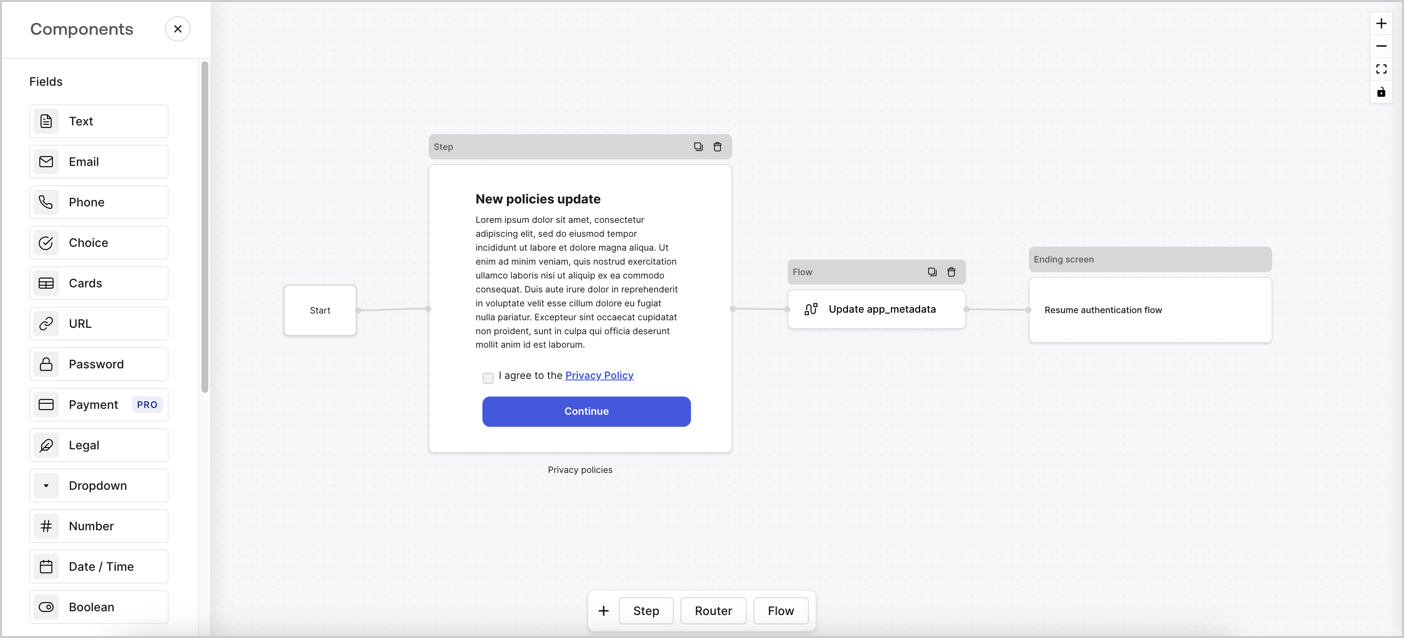
Forms for Actions allows you to create custom privacy policies flows and store the consent under the `app_metadata` object.
<Frame>
  <img src="https://mintcdn.com/docs-dev-docs-ai-docs-migration-poc/frCTjKq-WyUjSqji/docs/images/cdy7uua7fh8z/6i68dMvHDTijfRmSgN1x8Q/ad900e7d4c0fb34645921435472b8684/privavy-policy-form.png?fit=max&auto=format&n=frCTjKq-WyUjSqji&q=85&s=964539a69d2487934e92195d7dd943d5" alt="Dashboard > Actions > Forms > Privacy policy use case" data-og-width="1404" width="1404" data-og-height="638" height="638" data-path="docs/images/cdy7uua7fh8z/6i68dMvHDTijfRmSgN1x8Q/ad900e7d4c0fb34645921435472b8684/privavy-policy-form.png" data-optimize="true" data-opv="3" srcset="https://mintcdn.com/docs-dev-docs-ai-docs-migration-poc/frCTjKq-WyUjSqji/docs/images/cdy7uua7fh8z/6i68dMvHDTijfRmSgN1x8Q/ad900e7d4c0fb34645921435472b8684/privavy-policy-form.png?w=280&fit=max&auto=format&n=frCTjKq-WyUjSqji&q=85&s=1934c11f0804a7a4c264cb571471f4b6 280w, https://mintcdn.com/docs-dev-docs-ai-docs-migration-poc/frCTjKq-WyUjSqji/docs/images/cdy7uua7fh8z/6i68dMvHDTijfRmSgN1x8Q/ad900e7d4c0fb34645921435472b8684/privavy-policy-form.png?w=560&fit=max&auto=format&n=frCTjKq-WyUjSqji&q=85&s=b9b3656d51e10a36fd40d895a4ae55fb 560w, https://mintcdn.com/docs-dev-docs-ai-docs-migration-poc/frCTjKq-WyUjSqji/docs/images/cdy7uua7fh8z/6i68dMvHDTijfRmSgN1x8Q/ad900e7d4c0fb34645921435472b8684/privavy-policy-form.png?w=840&fit=max&auto=format&n=frCTjKq-WyUjSqji&q=85&s=3e86a16123b8905f12e8398a87737fb7 840w, https://mintcdn.com/docs-dev-docs-ai-docs-migration-poc/frCTjKq-WyUjSqji/docs/images/cdy7uua7fh8z/6i68dMvHDTijfRmSgN1x8Q/ad900e7d4c0fb34645921435472b8684/privavy-policy-form.png?w=1100&fit=max&auto=format&n=frCTjKq-WyUjSqji&q=85&s=980198a87245353742c3d27efb412cab 1100w, https://mintcdn.com/docs-dev-docs-ai-docs-migration-poc/frCTjKq-WyUjSqji/docs/images/cdy7uua7fh8z/6i68dMvHDTijfRmSgN1x8Q/ad900e7d4c0fb34645921435472b8684/privavy-policy-form.png?w=1650&fit=max&auto=format&n=frCTjKq-WyUjSqji&q=85&s=61ebf4150aa31b914e89bfd7ef8778e7 1650w, https://mintcdn.com/docs-dev-docs-ai-docs-migration-poc/frCTjKq-WyUjSqji/docs/images/cdy7uua7fh8z/6i68dMvHDTijfRmSgN1x8Q/ad900e7d4c0fb34645921435472b8684/privavy-policy-form.png?w=2500&fit=max&auto=format&n=frCTjKq-WyUjSqji&q=85&s=e987b4937e11743ce4bea6d5931b027d 2500w" />
</Frame>

The sections below outline how you can create an Update Policy form using nodes and flows, along with steps for adding your form to a [Post Login](/docs/customize/actions/explore-triggers/signup-and-login-triggers/login-trigger) Action.

## Create a form from scratch

Follow these steps to create a form to gather information:

1. Open the Form editor by selecting **Auth0 Dashboard > Actions > Forms.**
2. Select **Create Form** > **Start from scratch**.

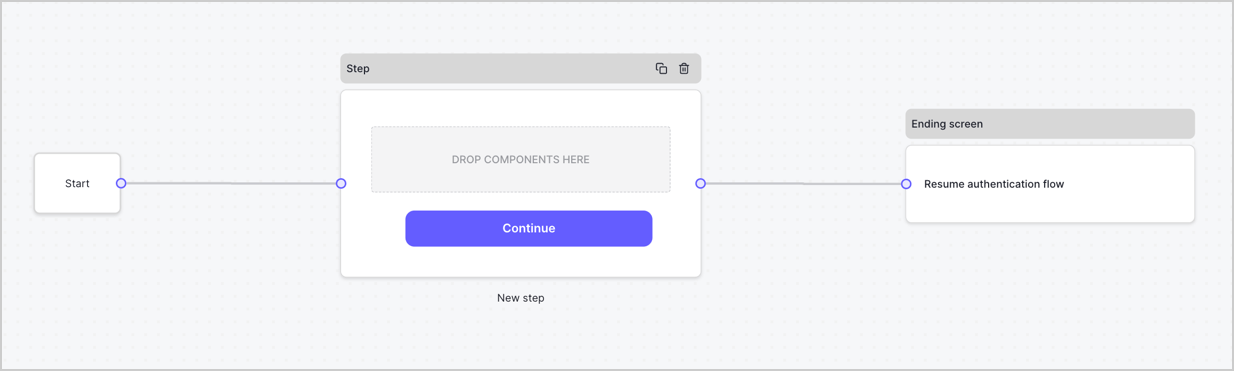
By default, a new form contains a Start node, a Step node, and an Ending screen node.
<Frame>
  <img src="https://mintcdn.com/docs-dev-docs-ai-docs-migration-poc/B6vbwc1szQPxGMTr/docs/images/cdy7uua7fh8z/2TZ9jSjgEcARFpULI6hz4R/a4319a1bd482f2ee5cc23100fdb2f42c/New-form-Forms-for-action-use-case.png?fit=max&auto=format&n=B6vbwc1szQPxGMTr&q=85&s=90f9aacfe60221ea42678ad92ff3cb38" alt="Dashboard > Forms > Use Cases > Form" data-og-width="1234" width="1234" data-og-height="371" height="371" data-path="docs/images/cdy7uua7fh8z/2TZ9jSjgEcARFpULI6hz4R/a4319a1bd482f2ee5cc23100fdb2f42c/New-form-Forms-for-action-use-case.png" data-optimize="true" data-opv="3" srcset="https://mintcdn.com/docs-dev-docs-ai-docs-migration-poc/B6vbwc1szQPxGMTr/docs/images/cdy7uua7fh8z/2TZ9jSjgEcARFpULI6hz4R/a4319a1bd482f2ee5cc23100fdb2f42c/New-form-Forms-for-action-use-case.png?w=280&fit=max&auto=format&n=B6vbwc1szQPxGMTr&q=85&s=21119e8c5415787f237de2c95e55e218 280w, https://mintcdn.com/docs-dev-docs-ai-docs-migration-poc/B6vbwc1szQPxGMTr/docs/images/cdy7uua7fh8z/2TZ9jSjgEcARFpULI6hz4R/a4319a1bd482f2ee5cc23100fdb2f42c/New-form-Forms-for-action-use-case.png?w=560&fit=max&auto=format&n=B6vbwc1szQPxGMTr&q=85&s=5985b19d12249a118bc229e50278420e 560w, https://mintcdn.com/docs-dev-docs-ai-docs-migration-poc/B6vbwc1szQPxGMTr/docs/images/cdy7uua7fh8z/2TZ9jSjgEcARFpULI6hz4R/a4319a1bd482f2ee5cc23100fdb2f42c/New-form-Forms-for-action-use-case.png?w=840&fit=max&auto=format&n=B6vbwc1szQPxGMTr&q=85&s=60f00b4d327d85aa410f4093f0622004 840w, https://mintcdn.com/docs-dev-docs-ai-docs-migration-poc/B6vbwc1szQPxGMTr/docs/images/cdy7uua7fh8z/2TZ9jSjgEcARFpULI6hz4R/a4319a1bd482f2ee5cc23100fdb2f42c/New-form-Forms-for-action-use-case.png?w=1100&fit=max&auto=format&n=B6vbwc1szQPxGMTr&q=85&s=f93b1e56170a725e0fabe66eba165723 1100w, https://mintcdn.com/docs-dev-docs-ai-docs-migration-poc/B6vbwc1szQPxGMTr/docs/images/cdy7uua7fh8z/2TZ9jSjgEcARFpULI6hz4R/a4319a1bd482f2ee5cc23100fdb2f42c/New-form-Forms-for-action-use-case.png?w=1650&fit=max&auto=format&n=B6vbwc1szQPxGMTr&q=85&s=496ada783e5002f061511fe39da86408 1650w, https://mintcdn.com/docs-dev-docs-ai-docs-migration-poc/B6vbwc1szQPxGMTr/docs/images/cdy7uua7fh8z/2TZ9jSjgEcARFpULI6hz4R/a4319a1bd482f2ee5cc23100fdb2f42c/New-form-Forms-for-action-use-case.png?w=2500&fit=max&auto=format&n=B6vbwc1szQPxGMTr&q=85&s=9ba781ce7f49cbc6ed7766ab6a186948 2500w" />
</Frame>

### Configure the Step node

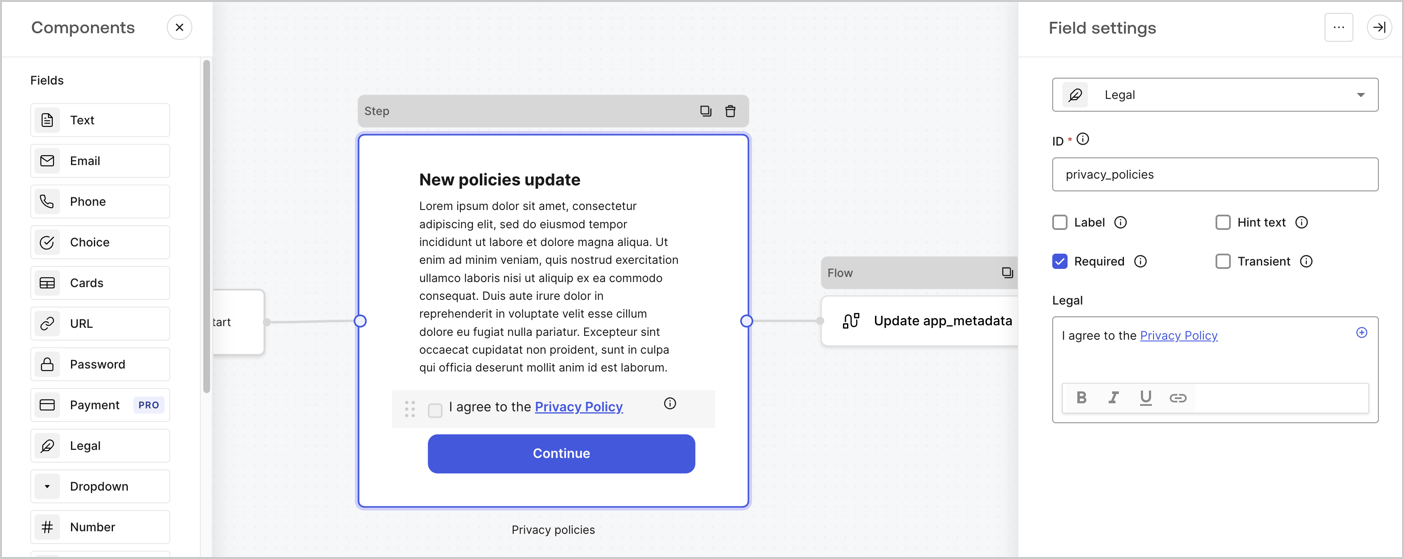
The Step node is the graphical interface visible to users. Add [Fields](/docs/customize/forms/nodes-and-components) to the Step node to collect the new agreement acceptance value by following these steps:

1. Drag a **Rich text** field from the **Components menu** into the **Step** node.

   * **Rich text**: Enter a description of your privacy policies updates.
   * Select **Save**.
2. Drag a **Legal** field into the **Step** node.

   * **ID**: Enter `privacy_policies`.
   * **Required**: Enable the checkbox.
   * **Legal**: Enter `I agree to the Privacy Policy`.
   * Select **Save**.
3. Select **Publish** to save.
<Frame>
  <img src="https://mintcdn.com/docs-dev-docs-ai-docs-migration-poc/DOhRoQLtDhY5SFkz/docs/images/cdy7uua7fh8z/59zFFjQjAnjogkc2QGIqqJ/0ad66b1b636544122aa4e65968b76c2c/privacy-policy-step-node.png?fit=max&auto=format&n=DOhRoQLtDhY5SFkz&q=85&s=fbc568f0af0999bb166afefe8f131321" alt="Dashboard > Actions > Forms > Use case privacy policy step node" data-og-width="1404" width="1404" data-og-height="559" height="559" data-path="docs/images/cdy7uua7fh8z/59zFFjQjAnjogkc2QGIqqJ/0ad66b1b636544122aa4e65968b76c2c/privacy-policy-step-node.png" data-optimize="true" data-opv="3" srcset="https://mintcdn.com/docs-dev-docs-ai-docs-migration-poc/DOhRoQLtDhY5SFkz/docs/images/cdy7uua7fh8z/59zFFjQjAnjogkc2QGIqqJ/0ad66b1b636544122aa4e65968b76c2c/privacy-policy-step-node.png?w=280&fit=max&auto=format&n=DOhRoQLtDhY5SFkz&q=85&s=38452afaf8426e04714e6368de955547 280w, https://mintcdn.com/docs-dev-docs-ai-docs-migration-poc/DOhRoQLtDhY5SFkz/docs/images/cdy7uua7fh8z/59zFFjQjAnjogkc2QGIqqJ/0ad66b1b636544122aa4e65968b76c2c/privacy-policy-step-node.png?w=560&fit=max&auto=format&n=DOhRoQLtDhY5SFkz&q=85&s=ef11004262ae889377bff57900a359b5 560w, https://mintcdn.com/docs-dev-docs-ai-docs-migration-poc/DOhRoQLtDhY5SFkz/docs/images/cdy7uua7fh8z/59zFFjQjAnjogkc2QGIqqJ/0ad66b1b636544122aa4e65968b76c2c/privacy-policy-step-node.png?w=840&fit=max&auto=format&n=DOhRoQLtDhY5SFkz&q=85&s=1ad3ac994a161fff36dc5cd8689493ee 840w, https://mintcdn.com/docs-dev-docs-ai-docs-migration-poc/DOhRoQLtDhY5SFkz/docs/images/cdy7uua7fh8z/59zFFjQjAnjogkc2QGIqqJ/0ad66b1b636544122aa4e65968b76c2c/privacy-policy-step-node.png?w=1100&fit=max&auto=format&n=DOhRoQLtDhY5SFkz&q=85&s=ae76f7537551b39c407355017814c72a 1100w, https://mintcdn.com/docs-dev-docs-ai-docs-migration-poc/DOhRoQLtDhY5SFkz/docs/images/cdy7uua7fh8z/59zFFjQjAnjogkc2QGIqqJ/0ad66b1b636544122aa4e65968b76c2c/privacy-policy-step-node.png?w=1650&fit=max&auto=format&n=DOhRoQLtDhY5SFkz&q=85&s=11e557cddade2c798a1da9a158584ada 1650w, https://mintcdn.com/docs-dev-docs-ai-docs-migration-poc/DOhRoQLtDhY5SFkz/docs/images/cdy7uua7fh8z/59zFFjQjAnjogkc2QGIqqJ/0ad66b1b636544122aa4e65968b76c2c/privacy-policy-step-node.png?w=2500&fit=max&auto=format&n=DOhRoQLtDhY5SFkz&q=85&s=364f7072b249e1470d3569ca928f3f11 2500w" />
</Frame>

### Configure the Flow node

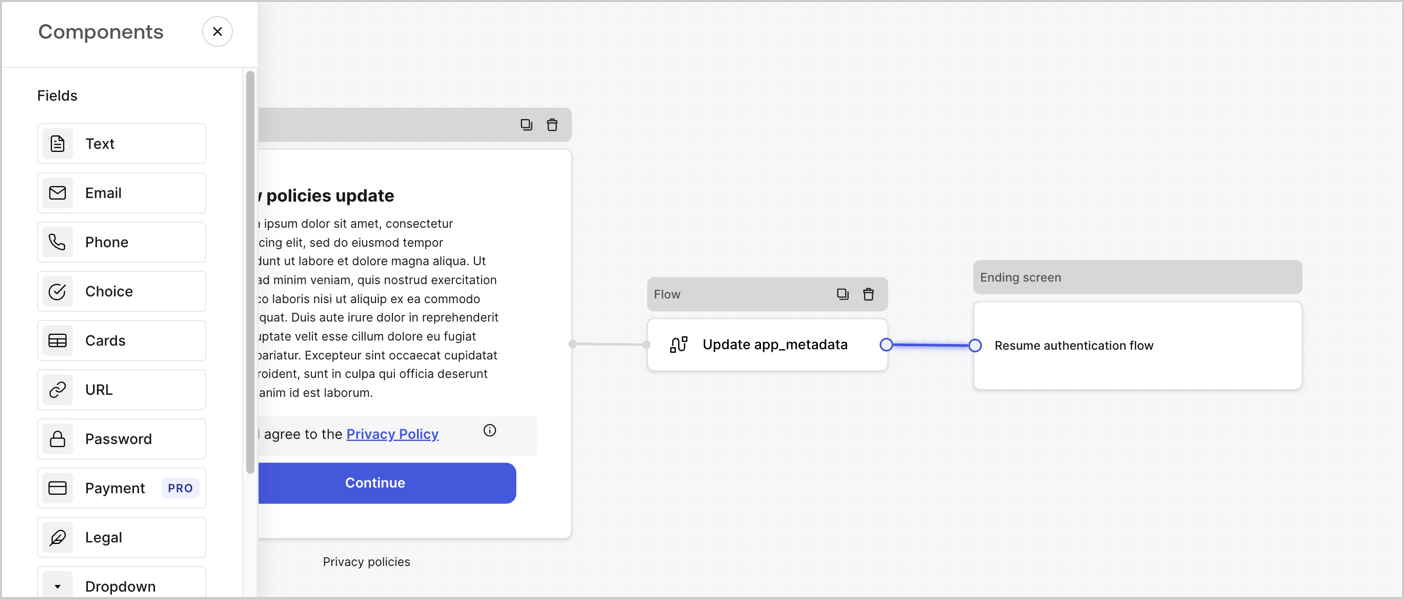
Add a **Flow** node after the **Step** node to update the `app_metadata` and resume the authentication flow by following these steps:

1. Select **Flow** from the bottom of the Form editor.
2. Remove the existing link between the **Step** and **Ending Screen** nodes.
3. Select the new **Flow** > **Click to add a flow** > **Create a new flow.**

   * Enter `Update app_metadata` in the **Name** field.
   * Select **Create**.
   * Select **Save**.
4. Link the **Flow** node to the **Step** and **Ending Screen** nodes as pictured below.
5. Select **Publish** to save.
<Frame>
  <img src="https://mintcdn.com/docs-dev-docs-ai-docs-migration-poc/frCTjKq-WyUjSqji/docs/images/cdy7uua7fh8z/6YIkzm7SrpM9LW76AXuRzh/353c518fe82bbaa440836da1d83596d6/link-policies.png?fit=max&auto=format&n=frCTjKq-WyUjSqji&q=85&s=6a2624a94c2376be0056c7d2ee1c24c1" alt="Dashboard > Actions > Forms > Form" data-og-width="1404" width="1404" data-og-height="599" height="599" data-path="docs/images/cdy7uua7fh8z/6YIkzm7SrpM9LW76AXuRzh/353c518fe82bbaa440836da1d83596d6/link-policies.png" data-optimize="true" data-opv="3" srcset="https://mintcdn.com/docs-dev-docs-ai-docs-migration-poc/frCTjKq-WyUjSqji/docs/images/cdy7uua7fh8z/6YIkzm7SrpM9LW76AXuRzh/353c518fe82bbaa440836da1d83596d6/link-policies.png?w=280&fit=max&auto=format&n=frCTjKq-WyUjSqji&q=85&s=fc5428da973dd26acdaf048482786f44 280w, https://mintcdn.com/docs-dev-docs-ai-docs-migration-poc/frCTjKq-WyUjSqji/docs/images/cdy7uua7fh8z/6YIkzm7SrpM9LW76AXuRzh/353c518fe82bbaa440836da1d83596d6/link-policies.png?w=560&fit=max&auto=format&n=frCTjKq-WyUjSqji&q=85&s=b94cd39f7b77f0c6be150bdf1341f801 560w, https://mintcdn.com/docs-dev-docs-ai-docs-migration-poc/frCTjKq-WyUjSqji/docs/images/cdy7uua7fh8z/6YIkzm7SrpM9LW76AXuRzh/353c518fe82bbaa440836da1d83596d6/link-policies.png?w=840&fit=max&auto=format&n=frCTjKq-WyUjSqji&q=85&s=5ab1464e119a262e8b03bdd3b5123e33 840w, https://mintcdn.com/docs-dev-docs-ai-docs-migration-poc/frCTjKq-WyUjSqji/docs/images/cdy7uua7fh8z/6YIkzm7SrpM9LW76AXuRzh/353c518fe82bbaa440836da1d83596d6/link-policies.png?w=1100&fit=max&auto=format&n=frCTjKq-WyUjSqji&q=85&s=115a67b8b5693b6e7ce1f504decaf1f0 1100w, https://mintcdn.com/docs-dev-docs-ai-docs-migration-poc/frCTjKq-WyUjSqji/docs/images/cdy7uua7fh8z/6YIkzm7SrpM9LW76AXuRzh/353c518fe82bbaa440836da1d83596d6/link-policies.png?w=1650&fit=max&auto=format&n=frCTjKq-WyUjSqji&q=85&s=81f1086abc3a11cffe00680f49257b6c 1650w, https://mintcdn.com/docs-dev-docs-ai-docs-migration-poc/frCTjKq-WyUjSqji/docs/images/cdy7uua7fh8z/6YIkzm7SrpM9LW76AXuRzh/353c518fe82bbaa440836da1d83596d6/link-policies.png?w=2500&fit=max&auto=format&n=frCTjKq-WyUjSqji&q=85&s=670d00f2257fdca4f208474a0a9edca0 2500w" />
</Frame>

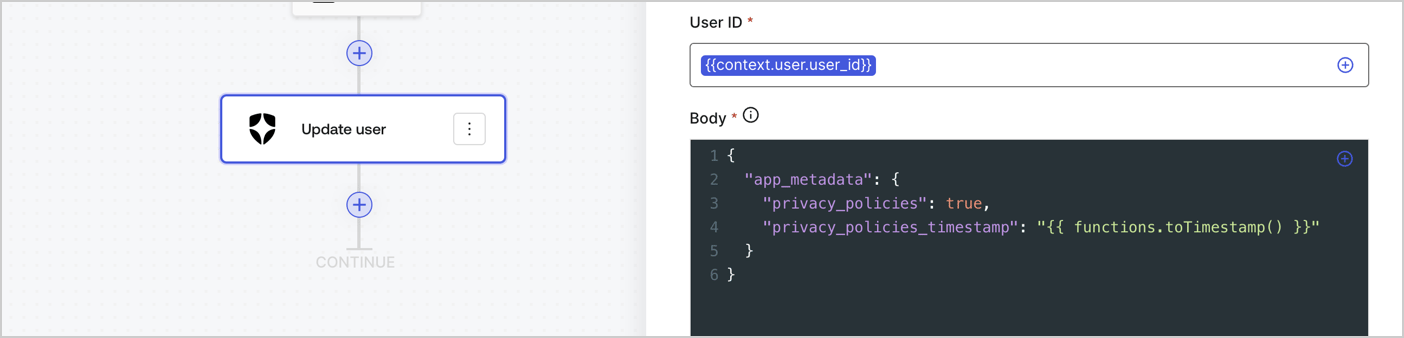
Add an Auth0 Update user action to the flow by following these steps:

1. Select the **Flow** **Update app\_metadata** > **Edit flow** to open the Flow editor in a new tab.
2. Below the StartAction, select the **+** icon to add an **Update user** action. Complete the fields below, then select **Save** to continue.

   * **Connection**: Select from the dropdown the Vault connection to your M2M application.

   * **User ID**: Enter `{{context.user.user_id}}`.

   * **Body**: Copy and paste the following code to update the app\_metadata with the privacy\_policies and privacy\_policies\_timestamp properties.

     ```text lines theme={null}
     {
       "app_metadata": {
         "privacy_policies": true,
         "privacy_policies_timestamp": "{{ functions.toTimestamp() }}"
       }
     }
     ```

   * Select **Save**.
3. Select **Publish** to save.
<Frame>
  <img src="https://mintcdn.com/docs-dev-docs-ai-docs-migration-poc/Sh6Ehn1Q1dvLA_Zo/docs/images/cdy7uua7fh8z/CvMNIwWrOUwaFW4X3G28p/1fb70ae57a20749d9ffaaba8dc0b7e26/update-user-privacy.png?fit=max&auto=format&n=Sh6Ehn1Q1dvLA_Zo&q=85&s=fdcd475e0202bade1624d8a485068479" alt="Dashboard > Actions > Forms > User case privacy policy code" data-og-width="1404" width="1404" data-og-height="338" height="338" data-path="docs/images/cdy7uua7fh8z/CvMNIwWrOUwaFW4X3G28p/1fb70ae57a20749d9ffaaba8dc0b7e26/update-user-privacy.png" data-optimize="true" data-opv="3" srcset="https://mintcdn.com/docs-dev-docs-ai-docs-migration-poc/Sh6Ehn1Q1dvLA_Zo/docs/images/cdy7uua7fh8z/CvMNIwWrOUwaFW4X3G28p/1fb70ae57a20749d9ffaaba8dc0b7e26/update-user-privacy.png?w=280&fit=max&auto=format&n=Sh6Ehn1Q1dvLA_Zo&q=85&s=0b17489312eeac7745c352ab2e56481a 280w, https://mintcdn.com/docs-dev-docs-ai-docs-migration-poc/Sh6Ehn1Q1dvLA_Zo/docs/images/cdy7uua7fh8z/CvMNIwWrOUwaFW4X3G28p/1fb70ae57a20749d9ffaaba8dc0b7e26/update-user-privacy.png?w=560&fit=max&auto=format&n=Sh6Ehn1Q1dvLA_Zo&q=85&s=15918e39052d279d76268531befd49dc 560w, https://mintcdn.com/docs-dev-docs-ai-docs-migration-poc/Sh6Ehn1Q1dvLA_Zo/docs/images/cdy7uua7fh8z/CvMNIwWrOUwaFW4X3G28p/1fb70ae57a20749d9ffaaba8dc0b7e26/update-user-privacy.png?w=840&fit=max&auto=format&n=Sh6Ehn1Q1dvLA_Zo&q=85&s=c67ec72098e5f9fdd5e26218612f2b84 840w, https://mintcdn.com/docs-dev-docs-ai-docs-migration-poc/Sh6Ehn1Q1dvLA_Zo/docs/images/cdy7uua7fh8z/CvMNIwWrOUwaFW4X3G28p/1fb70ae57a20749d9ffaaba8dc0b7e26/update-user-privacy.png?w=1100&fit=max&auto=format&n=Sh6Ehn1Q1dvLA_Zo&q=85&s=c93b0d3984a4827b79054af6a096b56f 1100w, https://mintcdn.com/docs-dev-docs-ai-docs-migration-poc/Sh6Ehn1Q1dvLA_Zo/docs/images/cdy7uua7fh8z/CvMNIwWrOUwaFW4X3G28p/1fb70ae57a20749d9ffaaba8dc0b7e26/update-user-privacy.png?w=1650&fit=max&auto=format&n=Sh6Ehn1Q1dvLA_Zo&q=85&s=e24addb91ed06b486557fac7c144ddd2 1650w, https://mintcdn.com/docs-dev-docs-ai-docs-migration-poc/Sh6Ehn1Q1dvLA_Zo/docs/images/cdy7uua7fh8z/CvMNIwWrOUwaFW4X3G28p/1fb70ae57a20749d9ffaaba8dc0b7e26/update-user-privacy.png?w=2500&fit=max&auto=format&n=Sh6Ehn1Q1dvLA_Zo&q=85&s=6226cca9655d24db7d5900cda8fbef41 2500w" />
</Frame>

<Callout icon="file-lines" color="#0EA5E9" iconType="regular">
  The flow **Update app\_metadata** adds a `privacy_policies true` value to the app`_metadata` object and also generates a timestamp with a [helper function.](/docs/customize/forms/variables)
</Callout>

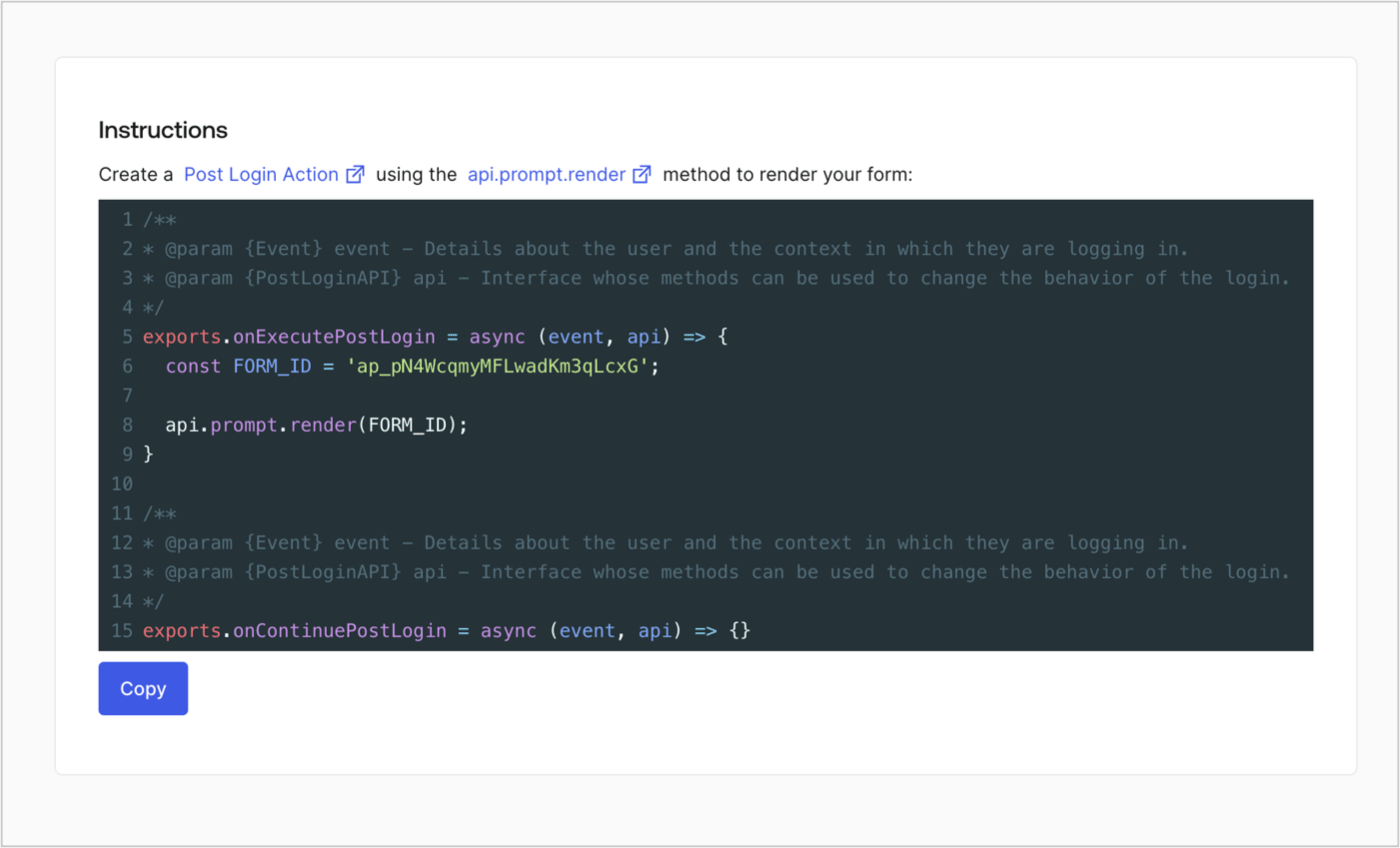
## Retrieve the form render code

Retrieve your form render code to visually render the form with a custom Post Login Action by following these steps:

* From the Form editor, select **`<> Render`**.
* Select **Copy**.
<Frame>
  <img src="https://mintcdn.com/docs-dev-docs-ai-docs-migration-poc/Td7TaYSzfoMHJ3Sq/docs/images/cdy7uua7fh8z/2EIUzc539sq9lwoTKbjoJv/496a864c0fc44a782c9cadca119dbfb0/embed.png?fit=max&auto=format&n=Td7TaYSzfoMHJ3Sq&q=85&s=8fbb8c3a553ace327e7a44d8b8e337b8" alt="Dashboard > Actions > Forms > Form > Embed" data-og-width="1400" width="1400" data-og-height="848" height="848" data-path="docs/images/cdy7uua7fh8z/2EIUzc539sq9lwoTKbjoJv/496a864c0fc44a782c9cadca119dbfb0/embed.png" data-optimize="true" data-opv="3" srcset="https://mintcdn.com/docs-dev-docs-ai-docs-migration-poc/Td7TaYSzfoMHJ3Sq/docs/images/cdy7uua7fh8z/2EIUzc539sq9lwoTKbjoJv/496a864c0fc44a782c9cadca119dbfb0/embed.png?w=280&fit=max&auto=format&n=Td7TaYSzfoMHJ3Sq&q=85&s=02069b6adde674047a168a535367796d 280w, https://mintcdn.com/docs-dev-docs-ai-docs-migration-poc/Td7TaYSzfoMHJ3Sq/docs/images/cdy7uua7fh8z/2EIUzc539sq9lwoTKbjoJv/496a864c0fc44a782c9cadca119dbfb0/embed.png?w=560&fit=max&auto=format&n=Td7TaYSzfoMHJ3Sq&q=85&s=50fe078a1a664b5ffa57b60bd49ea40e 560w, https://mintcdn.com/docs-dev-docs-ai-docs-migration-poc/Td7TaYSzfoMHJ3Sq/docs/images/cdy7uua7fh8z/2EIUzc539sq9lwoTKbjoJv/496a864c0fc44a782c9cadca119dbfb0/embed.png?w=840&fit=max&auto=format&n=Td7TaYSzfoMHJ3Sq&q=85&s=4311df7c72b13bfd488ada6c14f5b96f 840w, https://mintcdn.com/docs-dev-docs-ai-docs-migration-poc/Td7TaYSzfoMHJ3Sq/docs/images/cdy7uua7fh8z/2EIUzc539sq9lwoTKbjoJv/496a864c0fc44a782c9cadca119dbfb0/embed.png?w=1100&fit=max&auto=format&n=Td7TaYSzfoMHJ3Sq&q=85&s=5956c45606aabb3429272f0b7c96b3d9 1100w, https://mintcdn.com/docs-dev-docs-ai-docs-migration-poc/Td7TaYSzfoMHJ3Sq/docs/images/cdy7uua7fh8z/2EIUzc539sq9lwoTKbjoJv/496a864c0fc44a782c9cadca119dbfb0/embed.png?w=1650&fit=max&auto=format&n=Td7TaYSzfoMHJ3Sq&q=85&s=45fd859f1a316f8dfd4736ea7200d5a7 1650w, https://mintcdn.com/docs-dev-docs-ai-docs-migration-poc/Td7TaYSzfoMHJ3Sq/docs/images/cdy7uua7fh8z/2EIUzc539sq9lwoTKbjoJv/496a864c0fc44a782c9cadca119dbfb0/embed.png?w=2500&fit=max&auto=format&n=Td7TaYSzfoMHJ3Sq&q=85&s=5a3d2222ce7b3de944f71aa6b8cf5269 2500w" />
</Frame>

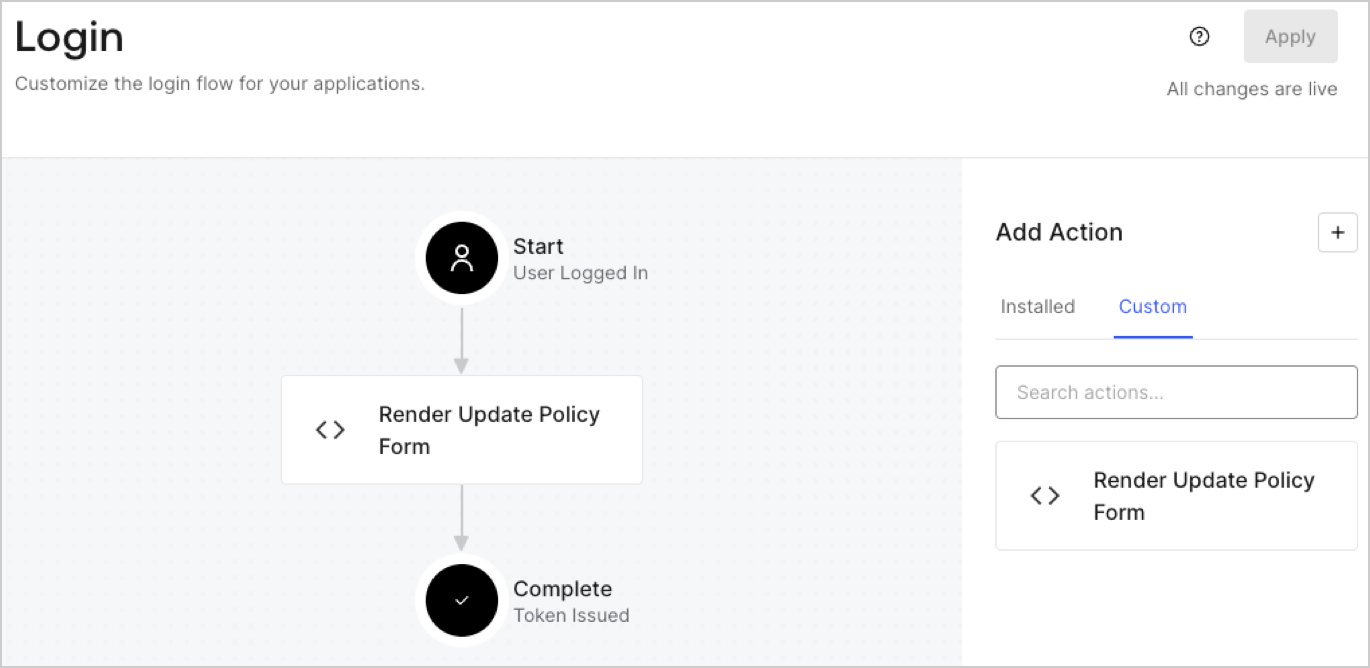
## Create a Post Login Action

Create a post-login Action to render your form by following these steps:

1. Navigate to **Auth0 Dashboard > Actions > Flows > Login.**
2. Select the **+** icon and Select **Build from scratch**:

   * **Name**: Enter `Render Update Policy Form`.
   * **Trigger**: Select `Login / Post Login`.
   * **Runtime**: Select the recommended version.
3. Select **Create**.

To configure the post-login Action:

1. Delete the existing code from the Code editor.
2. Paste the form render code into the Code editor.
3. Edit the code to define the conditional logic that will render the form.

   ```javascript lines theme={null}
   /**
   * @param {Event} event - Details about the user and the context in which they are logging in.
   * @param {PostLoginAPI} api - Interface whose methods can be used to change the behavior of the login.
   */
   exports.onExecutePostLogin = async (event, api) => {
     const FORM_ID = 'REPLACE_WITH_YOUR_FORM_ID';

     if (event.user.app_metadata.privacy_policies !== true) {
       api.prompt.render(FORM_ID);
     }
   }

   exports.onContinuePostLogin = async (event, api) => { }
   ```

   <Callout icon="file-lines" color="#0EA5E9" iconType="regular">
     The example code above will render the form when a user is missing the app metadata `privacy_policies` property.
   </Callout>
4. Select **Deploy.**
5. Drag and Drop the **Render Update Policy Form** Action to the **Login** flow.
   <Frame>
     <img src="https://mintcdn.com/docs-dev-docs-ai-docs-migration-poc/moxHFSOjDGi-KaXl/docs/images/cdy7uua7fh8z/5TOwDgevZsBqd7yZynUYWU/41ca909dc3007aed4f40ff794a05efa5/postlogin.png?fit=max&auto=format&n=moxHFSOjDGi-KaXl&q=85&s=1b6a7074fb0e29b0fcd201af5767f9e7" alt="Dashboard > Forms > Use Case > Render update policy form login action" data-og-width="1370" width="1370" data-og-height="668" height="668" data-path="docs/images/cdy7uua7fh8z/5TOwDgevZsBqd7yZynUYWU/41ca909dc3007aed4f40ff794a05efa5/postlogin.png" data-optimize="true" data-opv="3" srcset="https://mintcdn.com/docs-dev-docs-ai-docs-migration-poc/moxHFSOjDGi-KaXl/docs/images/cdy7uua7fh8z/5TOwDgevZsBqd7yZynUYWU/41ca909dc3007aed4f40ff794a05efa5/postlogin.png?w=280&fit=max&auto=format&n=moxHFSOjDGi-KaXl&q=85&s=b34c558a1ef32bf0605cdfc0ac8c24d0 280w, https://mintcdn.com/docs-dev-docs-ai-docs-migration-poc/moxHFSOjDGi-KaXl/docs/images/cdy7uua7fh8z/5TOwDgevZsBqd7yZynUYWU/41ca909dc3007aed4f40ff794a05efa5/postlogin.png?w=560&fit=max&auto=format&n=moxHFSOjDGi-KaXl&q=85&s=c5f9213b886206a4fa016404e9c78042 560w, https://mintcdn.com/docs-dev-docs-ai-docs-migration-poc/moxHFSOjDGi-KaXl/docs/images/cdy7uua7fh8z/5TOwDgevZsBqd7yZynUYWU/41ca909dc3007aed4f40ff794a05efa5/postlogin.png?w=840&fit=max&auto=format&n=moxHFSOjDGi-KaXl&q=85&s=add46d315a7f87f789898339dfdf1149 840w, https://mintcdn.com/docs-dev-docs-ai-docs-migration-poc/moxHFSOjDGi-KaXl/docs/images/cdy7uua7fh8z/5TOwDgevZsBqd7yZynUYWU/41ca909dc3007aed4f40ff794a05efa5/postlogin.png?w=1100&fit=max&auto=format&n=moxHFSOjDGi-KaXl&q=85&s=fd4f8000f0d6f88489f8088dfc3b1724 1100w, https://mintcdn.com/docs-dev-docs-ai-docs-migration-poc/moxHFSOjDGi-KaXl/docs/images/cdy7uua7fh8z/5TOwDgevZsBqd7yZynUYWU/41ca909dc3007aed4f40ff794a05efa5/postlogin.png?w=1650&fit=max&auto=format&n=moxHFSOjDGi-KaXl&q=85&s=41b28ff134335dcfbf6d889d290deba5 1650w, https://mintcdn.com/docs-dev-docs-ai-docs-migration-poc/moxHFSOjDGi-KaXl/docs/images/cdy7uua7fh8z/5TOwDgevZsBqd7yZynUYWU/41ca909dc3007aed4f40ff794a05efa5/postlogin.png?w=2500&fit=max&auto=format&n=moxHFSOjDGi-KaXl&q=85&s=b3adc1176ee6a7534b1b8b81b687c5bf 2500w" />
   </Frame>
6. Select **Apply.**

### Test implementation

Test the implementation by following these steps:

1. Log in with an existing user whose app`_metadata` attribute `privacy_policies` does not have a value.
2. The post-login Action in the Login flow will render the form and prompt for acceptance.
3. Select **Auth0 Dashboard > User Management > Users,** locate the user and verify that the `app_metadata` attribute `privacy_policies` contains a `true` value and a timestamp.
