> ## Documentation Index
> Fetch the complete documentation index at: https://docs-dev-docs-ai-docs-migration-poc.mintlify.site/llms.txt
> Use this file to discover all available pages before exploring further.
# Messages personnalisés et traduction
> Cette section décrit comment créer des messages personnalisés et des traductions avec les formulaires.
Vous pouvez personnaliser les messages du formulaire pour offrir à vos utilisateurs une expérience unique. En outre, vous pouvez traduire les composants des formulaires, les erreurs et d’autres messages personnalisés dans d’autres langues pour une expérience localisée.
## Messages
Grâce à l’éditeur de formulaires, vous pouvez personnaliser les messages d’erreur et créer d’autres messages personnalisés pour vos utilisateurs.
### Messages d’erreur
Vous pouvez créer des messages d’erreur personnalisés pour remplacer les messages d’erreur par défaut de vos formulaires.
Pour créer des messages d’erreur personnalisés, suivez les étapes ci-après :
1. Dans Auth0 Dashboard, accédez à **Actions > Forms (Formulaires)**.
2. Sélectionnez **Messages** dans le menu de gauche de l’éditeur de formulaire.
3. Sélectionnez l’onglet **Errors (erreurs)**.
4. Saisissez vos messages d’erreur personnalisés dans les champs appropriés pour remplacer les messages par défaut.
5. Sélectionnez **Publish (Publier)** pour enregistrer.
### Messages personnalisés
Vous pouvez créer des messages personnalisés à ajouter aux messages par défaut pour une expérience de formulaire encore plus personnalisée. Par exemple, vous pouvez ajouter un message personnalisé qui s’affiche aux utilisateurs lorsqu’une action débouche sur une erreur dans un flux.
#### Créer des messages personnalisés
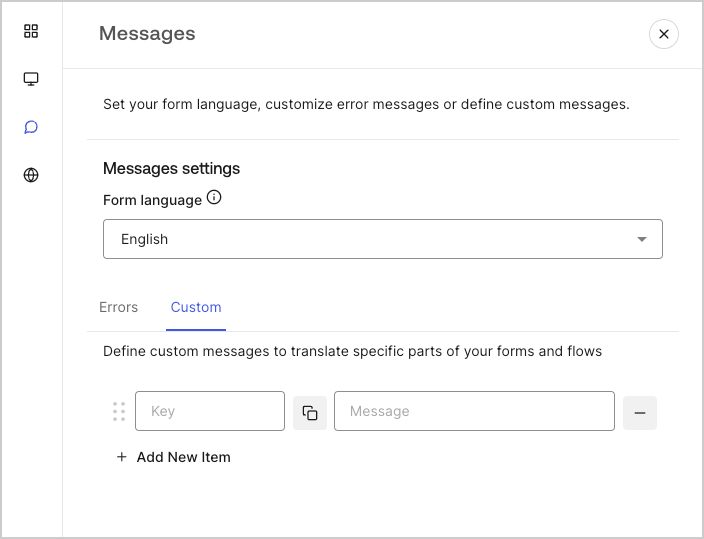
Pour créer des messages personnalisés, suivez les étapes ci-après :
1. Dans le menu de gauche de l’éditeur de formulaires, sélectionnez **Messages**.
2. Sélectionnez l’onglet **Custom (Personnalisés)** , puis **Add New Item (Ajouter un nouvel élément)**.
3. À gauche, ajoutez une clé unique pour votre message\*\*.\*\* Ensuite, **saisissez** votre message personnalisé dans le champ à droite.
4. Sélectionnez **Publish (Publier)** pour enregistrer.
 #### Ajouter des messages personnalisés à vos formulaires
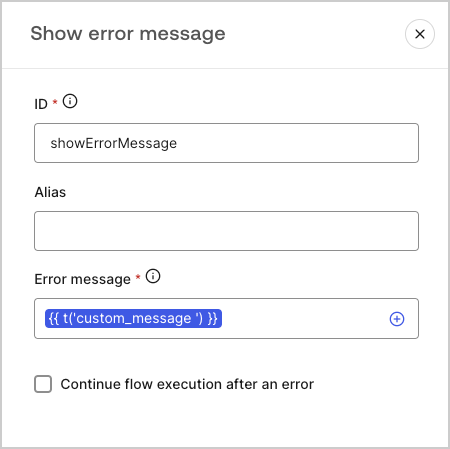
Pour référencer vos messages personnalisés dans vos formulaires, utilisez la fonction `{{t(’custom_unique_key’)}}` avec la clé unique du message personnalisé.
#### Ajouter des messages personnalisés à vos formulaires
Pour référencer vos messages personnalisés dans vos formulaires, utilisez la fonction `{{t(’custom_unique_key’)}}` avec la clé unique du message personnalisé.
 ## Traductions
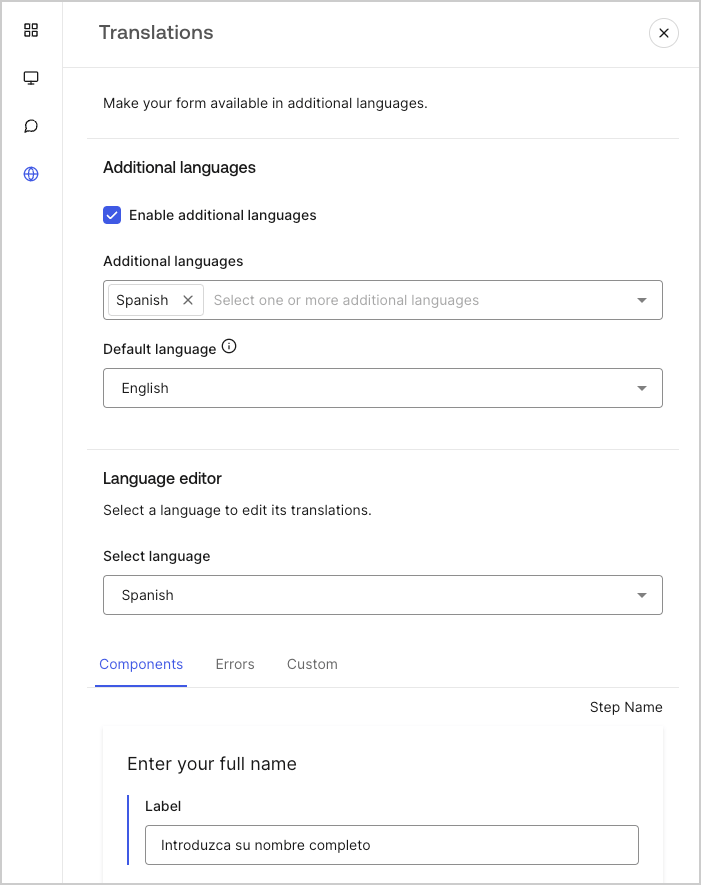
Vous pouvez utiliser la fonctionnalité Translations (traduction) pour créer une expérience utilisateur internationale pour vos formulaires. Cette fonctionnalité s’appuie sur la langue du navigateur de l’utilisateur pour déterminer la langue appropriée pour vos formulaires.
Par défaut, des traductions pour certains messages d’erreur standard sont fournies en espagnol. Cependant, pour promouvoir une expérience utilisateur de qualité, vous pouvez définir les traductions de vos composants de formulaire, des erreurs et des messages personnalisés dans la langue de votre choix.
Pour activer les traductions, suivez les étapes ci-dessous :
1. Dans Auth0 Dashboard, accédez à **Actions > Forms (Formulaires)**.
2. Sélectionnez **Translations (Traductions)** dans le menu de gauche de l’éditeur de formulaire.
3. Cochez **Enable additional languages (Activer des langues supplémentaires)**.
4. Sélectionnez les langues souhaitées dans le menu déroulant **Additional languages (Langues supplémentaires)**.
### Traduire les messages
Avec l’éditeur de langue, vous pouvez définir des traductions pour vos composants de formulaire, erreurs et autres messages personnalisés.
Pour définir vos traductions, suivez les étapes ci-après :
1. Sélectionnez la langue souhaitée dans la liste déroulante **Select language (Sélectionner la langue)**.
2. Sélectionnez l’un des onglets suivants pour commencer à définir vos traductions :
1. **Components (Composants)**
2. **Errors (Erreurs)**
3. **Custom (Personnalisés)**
3. Pour chaque champ disponible, fournissez vos traductions si nécessaire.
4. Sélectionnez **Publish (Publier)** pour enregistrer.
## Traductions
Vous pouvez utiliser la fonctionnalité Translations (traduction) pour créer une expérience utilisateur internationale pour vos formulaires. Cette fonctionnalité s’appuie sur la langue du navigateur de l’utilisateur pour déterminer la langue appropriée pour vos formulaires.
Par défaut, des traductions pour certains messages d’erreur standard sont fournies en espagnol. Cependant, pour promouvoir une expérience utilisateur de qualité, vous pouvez définir les traductions de vos composants de formulaire, des erreurs et des messages personnalisés dans la langue de votre choix.
Pour activer les traductions, suivez les étapes ci-dessous :
1. Dans Auth0 Dashboard, accédez à **Actions > Forms (Formulaires)**.
2. Sélectionnez **Translations (Traductions)** dans le menu de gauche de l’éditeur de formulaire.
3. Cochez **Enable additional languages (Activer des langues supplémentaires)**.
4. Sélectionnez les langues souhaitées dans le menu déroulant **Additional languages (Langues supplémentaires)**.
### Traduire les messages
Avec l’éditeur de langue, vous pouvez définir des traductions pour vos composants de formulaire, erreurs et autres messages personnalisés.
Pour définir vos traductions, suivez les étapes ci-après :
1. Sélectionnez la langue souhaitée dans la liste déroulante **Select language (Sélectionner la langue)**.
2. Sélectionnez l’un des onglets suivants pour commencer à définir vos traductions :
1. **Components (Composants)**
2. **Errors (Erreurs)**
3. **Custom (Personnalisés)**
3. Pour chaque champ disponible, fournissez vos traductions si nécessaire.
4. Sélectionnez **Publish (Publier)** pour enregistrer.